

Introduction to Agent 365
Agent 365 is a new agent control plane designed to help organizations manage, secure, and scale AI agents across the Microsoft ecosystem. As enterprises increasingly build agents using different tools and platforms, the need for centralized governance and visibility becomes critical. Agent 365 addresses this challenge by providing a single control plane to manage all agents in one place.
From a Microsoft technology perspective, agents can be built using multiple tools, including Copilot Studio, Copilot Studio Light, Azure AI Foundry, SDKs, and Visual Studio Code extensions. However, these agents are often managed separately across different administrative portals, creating fragmentation and complexity. Agent 365 unifies this experience.
The Need for a Centralized Agent Control Plane
Today, different types of agents are configured and managed through different interfaces:
-
Microsoft 365 Copilot agents are managed through the Microsoft 365 Admin Center
-
Copilot Studio agents are managed via the Power Platform Admin Center
-
Azure AI Foundry agents are managed through the Azure Portal
This fragmentation makes it difficult to track, secure, and govern agents consistently. Agent 365 brings all agents together under a single control plane, allowing organizations to manage the entire agent lifecycle from one place.
To achieve this, each agent is assigned a unique identifier, enabling consistent lifecycle management, access control, and security enforcement.
Microsoft Entra Agent ID
At the core of Agent 365 is the Microsoft Entra Agent ID. Every agent receives its own unique identity, which is used for:
-
Lifecycle management
-
Access and permission control
-
Identity-based security
-
Compliance and auditing
These agent identities allow organizations to apply enterprise-grade identity and access management practices to AI agents, similar to how users and applications are managed today.
Core Capabilities of Agent 365
Agent 365 is built around five major pillars:
1. Agent Registry
The registry provides a consolidated view of all agents across the organization, regardless of where they were created. This includes agents built using Copilot Studio, Copilot Studio Light, Microsoft 365 Copilot Chat, and Azure AI Foundry.
2. Access Control and Policy Enforcement
Built-in policy enforcement enables administrators to apply consistent governance rules across all agents. Policies can control sharing, deployment, usage, and access permissions.
3. Visualization and Analytics
Agent 365 provides insights into agent performance, usage, return on investment, and overall adoption. This visibility helps organizations understand how agents are contributing to productivity and business outcomes.
4. Interoperability
The platform supports interoperability across Microsoft tools, open-source technologies, and partner ecosystems. Agents can be equipped with applications and data to simplify workflows and enhance collaboration between humans and agents.
5. Security and Compliance
Agent 365 is backed by Microsoft’s enterprise-grade security infrastructure. It integrates with Microsoft Defender, Entra, and Purview to provide identity protection, compliance controls, observability, and threat detection.
Key Stakeholders and Use Cases
IT Administrators
For IT administrators, Agent 365 provides a single pane of glass to monitor agent activity, enforce policies, and manage security threats. Agents can be viewed and managed through both the Microsoft 365 Admin Center and the Entra Admin Center.
Business Decision Makers
Business leaders can use Agent 365 to measure productivity gains and business outcomes driven by agent deployment, enabling more informed strategic decisions.
Information Workers
Information workers can delegate repetitive and monotonous tasks to agents, collaborate seamlessly with them, and focus on higher-value work.
Security Teams
Security professionals benefit from centralized identity control, authentication, compliance, and observability. Agent 365 helps manage agent sprawl and ensures agents are used only for approved purposes.
Agent Developers
Developers gain access to a unified SDK and framework, support for external tools and MCP, and the ability to onboard, certify, and deploy agents across the enterprise.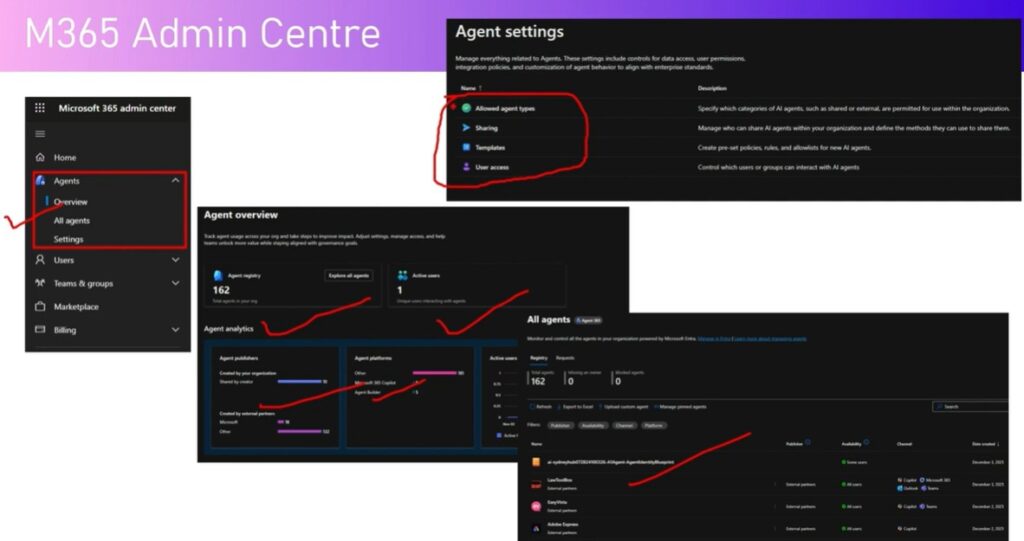
Managing Agents in the Microsoft 365 Admin Center
Within the Microsoft 365 Admin Center, administrators can:
-
View the agent registry and total number of agents
-
Monitor active users, publishers, and platforms
-
Configure sharing and deployment settings
-
Control which types of agents are allowed (shared, external, or internal)
-
Block, deploy, or remove agents
-
Assign owners to agents for compliance purposes
Custom agents can also be uploaded using a manifest and deployed to specific users, groups, or the entire organization.
Agent Management in Microsoft Entra
When an agent is provisioned, a corresponding application registration is automatically created in Microsoft Entra. In the Entra Admin Center, administrators can access:
-
Agent identities and object IDs
-
Creation dates and provisioning sources
-
Enterprise applications associated with agents
-
Agent collections and quarantine groups
This backend view provides deeper visibility into how agents are authenticated and managed within the tenant.
Agent Blueprints and Collections
Agent Blueprints
Blueprints are parent templates that power agent identities within a tenant. They define how agents are provisioned, consented, and secured. Administrators can:
-
Assign owners and sponsors
-
Grant admin or user consent
-
Disable agents
-
View audit and sign-in logs
Owners manage the entire agent identity, while sponsors are responsible for lifecycle oversight.
Agent Collections
Agent collections allow organizations to group agents automatically or manually. These collections can be used for governance scenarios such as global quarantine or custom compliance controls.
Conclusion
Agent 365 provides a comprehensive, enterprise-ready foundation for managing AI agents across the Microsoft ecosystem. By introducing a unified control plane, Entra-based agent identities, and deep integration with Microsoft security and administration tools, Agent 365 enables organizations to scale AI agents securely, consistently, and efficiently.
As agent adoption grows, Agent 365 becomes a critical platform for governance, security, and operational excellence in the AI-driven workplace.