

For a CTO or an infrastructure architect in the small and medium-sized business (SME) segment, the question of scaling has long moved into the realm of strict economic efficiency. In a highly competitive IT market, where requirements for the fault tolerance of digital services are growing against the backdrop of cloud cost optimization, containerization has ceased to be the exclusive privilege of tech giants. Today, kubernetes for business is a strategic tool capable of both protecting a company from cash shortages during peak loads and turning into a budget black hole if you initiate a kubernetes deployment without a clear understanding of the process’s economics.
Many growing product companies, online stores, and local SaaS platforms face a classic development dilemma: the old monolithic architecture on virtual machines starts slowing down releases and crashing during traffic surges, while switching to microservices frightens them with the uncertainty of the budget. A myth has formed around container orchestration as a silver bullet that automatically solves all performance issues. In practice, however, the price of a technological leap consists not only of cloud provider tariffs from AWS, Azure, or Google Cloud, but also of the cost of scarce engineering talent, the transformation of CI/CD processes, and a deep restructuring of application logic.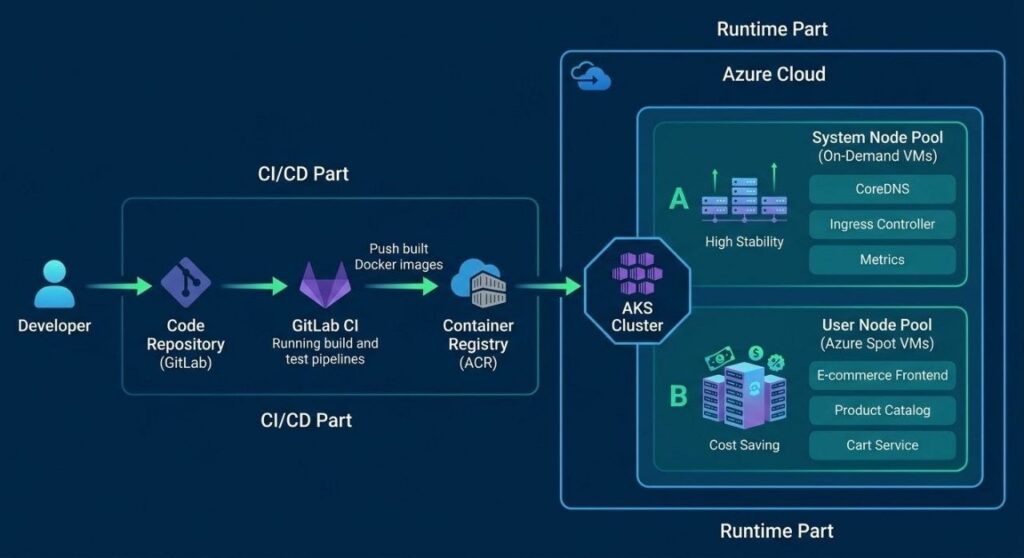
In this comprehensive guide, we will break down the anatomy of infrastructure costs for small and medium-sized businesses, define clear technical and commercial triggers for moving to cluster orchestration, and use a real-world case study of an e-commerce project to show how the final kubernetes price is formed and how to achieve return on investment (ROI) in the short term.
What is Kubernetes Today: The Evolution from Hype to Industry Standard
Just a few years ago, running containers via Docker Compose or managing a group of virtual machines with automation scripts seemed like sufficient measures for most web applications. However, the growth of data volumes, the need to integrate with dozens of external APIs, and the requirements for Zero-Downtime Deployment have changed the rules of the game.
Today, Kubernetes (K8s) is the de facto standard for container orchestration, acting as the operating system for a cloud data center. It takes on routine but critical tasks:
- Automated Scaling: Instant adding or removing of compute nodes (Nodes) and application instances (Pods) depending on CPU, memory, or custom request request queue metrics.
- Self-healing: If a microservice stops responding to health checks, the platform automatically restarts it, redirecting traffic to healthy instances without the intervention of an on-duty engineer.
- Hardware Abstraction: Developers write code without worrying about which specific physical server in a data center in Frankfurt, Warsaw, or Dublin their process will run on.
- Traffic Management and Load Balancing: Built-in Ingress and Service Discovery mechanisms allow seamless distribution of request streams and the implementation of advanced release strategies like Canary or Blue-Green deployments.
For small and medium-sized businesses, this means a fundamental shift: instead of paying for the idle time of servers bought “with a buffer” for potential peak loads, the company begins to apply FinOps methodology and consume computing power like a utility service — exactly as much as needed at any current second.
5 Signs That Your Business is Ready for Kubernetes (and 3 Reasons to Wait)
The decision to transform infrastructure must rely on measurable metrics and architectural constraints, rather than an engineering team’s desire to play with a modern tech stack. Let’s look at the indicators that point to a necessary migration.
Green Light: Architecture and Processes are Mature
- Microservices architecture is getting out of hand. If your application is split into 5–10 or more independent services, each requiring its own environment, dependencies, and database, manual management of their interactions, network access, and configuration updates becomes a source of critical errors.
- Unpredictable traffic peaks and seasonality. Retail, fintech, and delivery services are characterized by sharp spikes in activity: seasonal sales (Black Friday), marketing push campaigns, or holidays. If the infrastructure cannot scale in seconds, you lose customer loyalty at the most monetizable moment.
- Cloud costs are growing faster than company revenue. Traditional virtual machines (VMs) in AWS EC2 or Azure Virtual Machines often sit idle, utilizing only 10–15% of CPU time. An orchestrator allows you to pack containers tightly onto nodes, increasing resource utilization to 60–70% (bin packing).
- Releases are accompanied by downtime or block development. If rolling out a new feature to production requires a nightly maintenance window, temporary service suspension, or manual synchronization between QA and systems administration teams, your time-to-market drops critically.
- Multi-Cloud strategy and vendor lock-in protection. Forward-thinking businesses strive to diversify risks. Using standardized Kubernetes manifests allows you to migrate workloads between AWS, Microsoft Azure, Google Cloud Platform, or local private data centers with minimal code re-engineering.
Red Light: When a K8s Implementation Becomes a Costly Mistake
- You have a stable monolith with predictable load. If the system reliably serves consistent B2B clients, does not require frequent scaling, and all business logic runs efficiently on two or three well-tuned virtual machines, the overhead of supporting a cluster will outweigh any potential benefit.
- Early-stage startup (Before finding Product-Market Fit). At the MVP stage, the main goal is survival and validating hypotheses. Spending weeks of development and thousands of dollars designing a fault-tolerant architecture for a product that doesn’t yet have a stable stream of users is a surefire way to accelerate your investment burn rate.
- Lack of DevOps culture and specialized specialists. If the team lacks engineers experienced in Linux administration, network understanding (CNI, iptables, DNS), and Infrastructure as Code (Terraform) practices, the cluster will turn into an unstable “black box” where the slightest failure will bring the business to a complete halt.
Anatomy of Costs: What Total Cost of Ownership (TCO) Looks Like
To understand the true Total Cost of Ownership, expenses must be divided into three main categories: cloud provider computing resources, engineering payroll, and the costs of accompanying monitoring and security tools.
1. Infrastructure Costs: A Cloud Provider Comparison
Most small and medium-sized businesses choose Managed solutions from global leaders: Amazon EKS (Elastic Kubernetes Service), Azure AKS (Azure Kubernetes Service), or Google GKE (Google Kubernetes Engine). This eliminates the need to manually administer Master nodes (Control Plane).
The primary expenses are generated by:
- Worker Nodes: Payment for the virtual machines where the containers actually run.
- Network Traffic: Egress (outbound traffic), cross-zone traffic (between Availability Zones), and the cost of load balancers and NAT gateways.
- Data Storage: Block storage (EBS in AWS, Managed Disks in Azure) for system disks and caching.
Below is a comparison of estimated monthly infrastructure costs for an SME-scale company (approx. 15–20 microservices, 4–6 worker nodes with a total capacity of 24 vCPUs and 96 GB RAM, traffic ~1.5 TB/month):
| Expense Category | AWS (EKS) — Frankfurt Region | Azure (AKS) — Poland Region | Google Cloud (GKE) — Warsaw Region |
| Control Plane | ~$73 (flat rate) | Free (in the basic SLA) | ~$73 (flat rate per cluster) |
| Compute (Worker Nodes) | ~$680 (EC2 t3/m5) | ~$640 (D-series v5) | ~$650 (E2/N2 series) |
| Storage (SSD Disks) | ~$90 (gp3 disks) | ~$85 (Premium SSD) | ~$90 (pd-ssd) |
| Network (LB + Egress + NAT) | ~$160 | ~$140 | ~$150 |
| Total Infrastructure Bill | ~$1,003 / mo | ~$865 / mo | ~$963 / mo |
Note: Utilizing Spot/Preemptible instances (compute capacity that providers sell at a discount of up to 70–80% with the caveat that they can reclaim it at any moment) allows you to slash the Compute line item nearly in half for stateless services and background workers.
2. Human Resource Costs: In-House vs. Outsourcing
The most significant expense item when deploying and supporting container orchestration is the engineering talent. You cannot manage a production cluster using a developer working in background mode, and the international market for DevOps/SRE specialists maintains a high compensation ceiling.
According to tech market analytics and hiring statistics, the median salary of an experienced DevOps engineer anchors at a high professional tier. In practice, professional ranges (USD, B2B, NET) look as follows:
- Middle DevOps / SRE Engineer: $2,800 – $3,800 per month (the median for closed tech vacancies anchors at $3,500). This specialist is capable of maintaining an existing cluster, writing Helm charts, and setting up CI/CD pipelines and monitoring.
- Senior DevOps / Cloud Architect: $4,800 – $6,300 per month (Team Lead roles and Seniors in product companies with strong language skills can reach $6,500+). This is a specialist capable of designing a fault-tolerant architecture from scratch, implementing a Service Mesh, DevSecOps, and conducting cloud financial optimization (FinOps).
For reliable, round-the-clock support of critical infrastructure (99.99% SLA), relying on a single person is an unacceptable risk (Bus Factor = 1). A minimal in-house team requires hiring at least two specialists (e.g., 1 Senior/Architect + 1 Middle), which translates to a payroll fund ranging from $7,600 to $10,100 monthly, excluding taxes, recruiting, vacations, and retention costs. For many small and medium-sized businesses, maintaining such a staff is often economically impractical.
This is why the Managed DevOps / Outstaffing model is highly popular in the SME segment:
- The initial kubernetes implementation and architecture building is outsourced to a specialized team for a fixed fee. An implementation project costs on average $5,000 – $10,000 depending on the legacy volume.
- Subsequent ongoing support (SLA subscription on outsource) costs $1,500 – $3,500 per month, which reduces recurring talent expenditures by 2–3 times compared to an in-house team.
3. Hidden Costs: Observability and Security
A production cluster cannot survive without deep observability. You must know exactly which microservice is consuming memory, where database connection leaks are happening, and why user response latency is increasing.
Here, businesses face a choice between Open Source and ready-made platforms:
- Self-hosted Stack (Prometheus + Grafana + Vector + OpenSearch): Licenses are free, but you will have to pay for additional servers to store logs and metrics (~$150–$300/month for compute resources) plus engineering hours for their maintenance and updates.
- SaaS Platforms (Datadog, New Relic): They provide out-of-the-box analytics, but their pricing is tied to the number of hosts and the volume of indexed logs. The SaaS monitoring bill for an SME-scale cluster ranges from $250 to $600 per month.
Practical Case Study: Implementing Kubernetes for an E-Commerce Store
To demonstrate how theory aligns with the reality of an SME business, let’s examine an infrastructure transformation case for a specialized online store (household appliances and gadgets).
Baseline Data and Client Issues
- Client: An online store with ~15,000 unique daily visitors. During marketing campaigns, traffic increases to 60,000 unique visitors per day.
- Old Architecture: A monolithic application built on .NET (Backend API + Monolithic Frontend) hosted in the Microsoft Azure cloud. The infrastructure consisted of 6 D-series virtual machines, a manual load balancer, and an Azure SQL database.
- Core Business Problems:
- Degradation during peak sales: When targeted advertising or push notifications were launched, the servers failed to scale in time. The process of spinning up a new virtual machine and deploying code took up to 20 minutes. The site began throwing 502/504 errors, customers migrated to competitors, and the marketing budget was wasted inefficiently.
- High cost of idle resources: To handle potential traffic surges, the client kept 6 virtual machines running 24/7. The monthly bill from Microsoft Azure averaged $3,400, even though CPU utilization plummeted to a minimum at night.
- Development blockers: Releasing new functionality required a night-time maintenance window. Due to the fear of failures, releases were conducted once every two weeks, which choked hypothesis testing.
Step-by-Step Migration Plan and Solution Architecture
A team of external architects, working with the internal tech lead, developed a migration roadmap scheduled over 3 months without interrupting ongoing sales.
[Old Monolith in Azure VMs]
       │ (Audit, containerization, and domain separation)
       ▼
[GitLab CI/CD] ──(Building Docker Images)──► [Azure Container Registry]
                                                  │
                                                  ▼
[ArgoCD (GitOps)] ──(Manifest Sync)──► [Azure Kubernetes Service (AKS)]
                                                  ├── Node Pool 1: System (Core DNS, Ingress)
                                                  ├── Node Pool 2: Application (Stateless API)
                                                  └── Node Pool 3: Spot Instances (Background Workers)
Phase 1: Containerization and CI/CD Preparation (Month 1)
The first three independent services were extracted from the monolith: catalog, cart, and the auth API. The applications were wrapped into Docker images. GitLab CI was utilized for version control and the CI pipeline.
Phase 2: Cluster Engineering via Infrastructure as Code (3 weeks)
The entire new infrastructure in Azure was provisioned as code using Terraform. An Azure Kubernetes Service (AKS) cluster was deployed with three group node pools:
- System Pool: For core infrastructure components (NGINX Ingress Controller, cert-manager certificates).
- Application Pool (Standard VMs): For critical API services with guaranteed uptime requirements.
- Worker Pool (Spot VMs): For asynchronous tasks — generating product feeds, processing images, and handling trigger emails. Utilizing Spot instances here generated a 70% savings rate compared to standard billing loops.
Phase 3: Setting up GitOps and Autoscaling (3 weeks)
To control application tracking, ArgoCD was deployed. Two tiers of scaling metrics were calibrated: Horizontal Pod Autoscaler (increasing application copies within 3 seconds when CPU loads cross 60%) and Cluster Autoscaler (adding clean VMs to the cluster within 60 seconds during resource deficits).
Phase 4: Traffic Cutover (2 weeks)
Traffic from the old monolith was gradually phased into the K8s cluster using Cloudflare: initially 5%, then 20%, 50%, and finally 100%. The legacy virtual machines were completely decommissioned.
Financial and Technical Outcomes of Migration
Following the finalization and stabilization of the infrastructure layout, the company extracted measurable business returns:
| Efficiency Metric | Pre-Migration (Monolith on VMs) | Post-Kubernetes Deployment | Delta / Business Result |
| Monthly Cloud Bill (Azure) | $3,400 | $2,150 | Savings of $1,250/mo (-36%) |
| Scaling Time under Load | 20 minutes (manual/VM) | 3 seconds (Pods), 60 sec (Nodes) | Hundreds of times faster |
| Production Release Frequency | Once every 2 weeks | Multiple times a day | Surge in update delivery speed |
| Release Downtime | 15 minutes (at night) | 0 minutes (Rolling Updates) | 100% website availability |
| Campaign Uptime (SLA) | 99.2% (crashed at peak loads) | 99.97% | Zero lost orders during peak traffic |
Project Expense Ledger (Transformation Investments):
- External architecture blueprint and engineering services (Turnkey Outsource DevOps project, 2 months): $8,500.
- Internal developer training engineering hours (Docker/K8s onboarding workshops): $1,000.
- Dual running costs during transition (2 months of running old and new infrastructure loops concurrently): ~$4,000.
- Total Corporate Outlay: $13,500.
Return on Investment (ROI):
Given the direct monthly cloud savings of $2,750 ($3,400 down to -> $2,150 with external support contract margins structured in), pure resource-driven infrastructure payback achieves parity within 4.9 months. When factoring in recovered losses from site downtime during marketing initiatives, the real return cycle took fewer than 4 months.
How to Calculate ROI and Justify the Transition to Business Owners
A technical leader in an SME environment often struggles to explain to an owner why they should spend money restructuring systems when “the site currently functions.” To secure approval, technical parameters must be recast into commercial risk models.
Incorporate these financial calculations when presenting your case:
1. Cost of Downtime
Quantify exactly how much money the business sheds for every hour the service remains unavailable during high-converting traffic loops.
- Example Calculation: If your e-commerce store runs an average ticket size of $100 and matches an average velocity of 40 orders per hour during marketing campaigns, one hour of downtime translates to $4,000 in direct lost top-line revenue, excluding the sunk costs of acquisition ad budgets. An orchestrator suppresses this risk down to near-zero levels via automated pod self-healing routines.
2. Shrinking Time-to-Market
In small and medium businesses, the company that wins is the one that tests marketing hypotheses and ships features fastest (such as a new delivery method or checkout gateway integration). If developers spend hours manually engineering builds or diagnosing staging environment drift instead of writing logic, the business pays for inefficiency. Automated container structures reclaim this time for product engineering loops.
Step-by-Step Roadmap: How to Begin the Transition Without Disrupting Processes
Clustering migrations require an evolutionary trajectory. Below is a validated deployment framework tailored for SME parameters.
Step 1: Application Assessment and Normalization (Weeks 1–3)
Before engineering any infrastructure nodes, confirm that your target software aligns with 12-Factor App rules:
- Strip stateful parameters completely out of local container runtimes (Stateless). Move assets, active sessions, and data states into external utilities (S3, Redis, PostgreSQL).
- Re-route internal telemetry: Applications must stream standard runtime logs out to output interfaces (stdout/stderr) rather than caching logs to internal drive pathways.
- Build native application health check pathways: Deploy explicit code endpoints like
/healthz(Liveness probe — checking if the core process functions) and/readyz(Readiness probe — indicating if the container can parse live network loops).
Step 2: Proof of Concept (PoC) on a Non-Critical Service (Weeks 4–6)
Isolate an ancillary utility, an internal admin workspace, or an asynchronous media handling tool.
- Spin up a minimal test sandbox layout in the cloud managed through Terraform scripts.
- Configure a simple build pipeline and build automatic containerization paths for the pilot app.
- Run simulated system stress: Manually crash pods to witness how quickly the automated system orchestrates recovery actions.
Step 3: Building Production Cluster Matrices and GitOps Pipelines (Weeks 7–10)
Following a validated pilot test phase, begin engineering production architectures designed for live commercial traffic:
- Enforce granular network rules (Network Policies) to strictly isolate microservices according to least-privilege paradigms.
- Configure access boundaries via Role-Based Access Control (RBAC), building distinct security walls between dev groups and staging testing teams.
- Deploy ArgoCD engine matrices to support GitOps principles, anchoring all configuration states firmly to your git version control branches.
Step 4: Iterative Traffic Cutover (Weeks 11–13)
Execute structured software rollouts across your live ecosystem:
- Run the modernized microservice layer directly inside the cluster parallel to the legacy VM app states.
- Route a thin 5% tier of live customer traffic through to the cluster (Canary Deployment). Monitor tracking trends, exception counts, and latency shifts closely.
- If engineering telemetry tracks optimally, escalate traffic shares incrementally to 100%, then clean and scale down your old compute servers completely.
FAQ: Definitive Answers for Engineering Leadership
1. Can we host database instances directly inside Kubernetes in an SME model?
Answer: Technically, it is achievable using dedicated database operators (e.g., CloudNativePG). However, for small and medium-sized businesses, we strongly recommend utilizing Managed database solutions from your cloud provider (Amazon RDS, Azure SQL). Managing database nodes directly inside a cluster demands deep specialized engineering resources in storage scaling, replication loops, and snapshot restoration. The business risk of data deletion combined with team maintenance overhead outweighs license savings.
2. What fits a small engineering team better: Docker Swarm or moving directly to Kubernetes?
Answer: Docker Swarm features a simpler learning path, but its developer ecosystem has largely stagnated. Kubernetes is the universal industry standard. All modern ecosystem tooling for automation, monitoring, and security is natively written for K8s. Finding skilled engineers or external engineering support partners fluent in K8s within the market is much easier than sourcing experts for niche or legacy orchestration structures.
3. What is the minimum infrastructure budget required to start?
Answer: Sourcing a minimal staging layer alongside a compact, production cloud setup requires a baseline compute expenditure of roughly $400–$600 per month. This effectively funds 3–4 standard compute nodes, primary storage blocks, and network load balancer assets.
4. How secure is Kubernetes right out of the box?
Answer: Default out-of-the-box configurations lean toward development speed, making cluster hardening an absolute necessity. You must systematically block containers from running with root privileges, deploy strict internal communication boundaries via Network Policies, and run Docker image vulnerability scanning routines directly during your CI/CD builds.
Conclusion: Taking the First Step Safely Without Harming Business Operations
Migrating to Kubernetes offers small and medium-sized companies a structural opportunity to optimize operational flexibility and scale down redundant IT expenses. Building an intentional, well-architected cloud layout returns its investment within the opening quarters of deployment by preventing site drops during peak sales traffic, wiping out bills for idle hardware, and automating manual release loops. The key to execution is avoiding unnecessary systemic complexity early on and sticking strictly to an incremental deployment roadmap.
Ready to uncover structural efficiencies across your infrastructure?
Protect your current sales tracking and avoid running experiments on live production environments. Secure an exhaustive technical and financial audit covering your present cloud infrastructure (AWS/Azure/GCP).
Our audit engineering process delivers:
- A full review of your current cloud billing data to reveal hidden strategies to cut up to 30% of baseline spend.
- An architectural readiness index of your application codebase for containerization.
- A structured, custom migration plan configured around exact kubernetes costs mapped to your business scale.
Book a consultation with a Cloud Architect — we will reach out directly to review the unique technical demands of your project.