

If your company is growing rapidly, scaling microservices, or planning a cloud migration, the container orchestration question is already solved: it’s K8s. But as soon as the architecture committee approves this standard, the Chief Technology Officer (CTO) and tech leads face a much more complex dilemma. What to choose: deploy a cluster on bare metal/virtual machines on your own, or trust cloud providers by choosing managed kubernetes?
The EKS vs self-hosted question is particularly acute, as the AWS ecosystem is one of the most popular, yet conceals many hidden costs. This choice is no less relevant for those heavily invested in Microsoft Azure or Google Cloud infrastructure.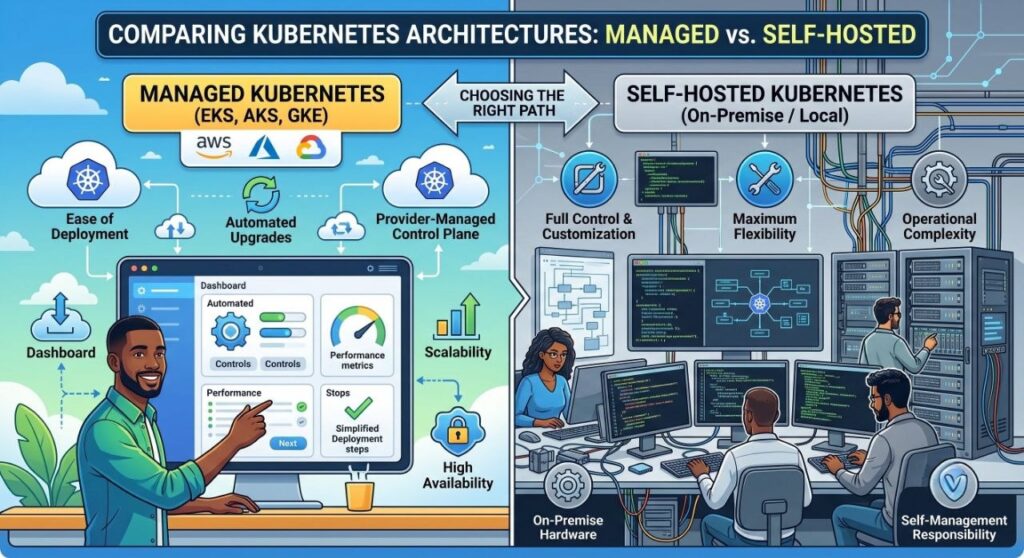
In this article, we take a deep dive into the technical and business aspects of both approaches. We’ll break down the true Total Cost of Ownership (TCO), hidden infrastructure risks, security considerations, and operational expenses so you can make an informed decision.
Anatomy of the Problem: Control Plane and Worker Nodes
To objectively evaluate the pros and cons, it’s worth recalling how a cluster is architecturally structured. K8s consists of two main entities:
- Control Plane: The brain of the cluster. Includes
kube-apiserver(entry point for all commands),etcd(key-value store for cluster state),kube-scheduler(assigns pods to nodes), andkube-controller-manager. - Worker Nodes: Servers where your containers actually run. This is where
kubelet,kube-proxy, and the container runtime (e.g., containerd) operate.
The main difference between the approaches lies in who maintains the Control Plane. In managed solutions, the cloud provider takes on this headache. In a self-hosted installation, you are responsible for every component.
Deep Dive into Self-Hosted Kubernetes (The Hard Way)
Deploying a cluster on your own (on-premise on physical servers or on IaaS solutions like standard EC2 instances) is often called “Kubernetes the Hard Way” (referencing Kelsey Hightower’s famous guide). This is the path of maximum control, but also maximum responsibility.
Benefits of a Self-Hosted Cluster
- Absolute configuration control: You can tune
kube-apiserverflags, configure aggressive caching, adjustetcdtimeouts for slower disks, and use non-standard CNI (Container Network Interface) plugins that may not be supported in cloud environments. - No Vendor Lock-in: Your cluster is not tied to a specific cloud’s APIs. Moving between data centers or IaaS providers boils down to transferring virtual machines and reconfiguring routing, rather than rewriting manifests and IAM policies.
- Data sovereignty and compliance: For fintech, healthcare platforms, or public sector projects in Ukraine, strict data localization requirements often apply. Physically owning the servers resolves most regulatory questions.
- Economies of scale (for massive infrastructures): With hundreds of nodes and petabytes of traffic, cloud markups on egress traffic and managed services become astronomical. Owning bare metal in colocation is several times cheaper at large scale.
Drawbacks and Hidden Pain Points
- etcd Management: This is arguably the most fragile component. The
etcddatabase requires high disk IOPS and strict quorum maintenance. Losing quorum due to a network partition will turn cluster recovery into a grey-hair-inducing ordeal for your DevOps engineers. - Downtime-free updates: Minor and major K8s version upgrades are painful. You need to carefully renew certificates, monitor deprecated APIs (e.g., migrating Ingress from
v1beta1tov1), sequentially update masters, and drain worker nodes without violating your application’s SLA. - High entry barrier and team cost: Setting up a highly available Control Plane requires at least 3 master nodes, a load balancer in front of them, and deep networking knowledge (BGP, Calico, Cilium). Finding engineers with this expertise is hard, and their salaries in the Ukrainian market start at $4,500–$6,000+.
Breakdown of Managed Kubernetes (EKS, AKS, GKE)
Cloud providers offer a model where the Control Plane is hidden from you. You interact only with the API server and manage Node Pools.
Why Businesses Choose Managed Solutions
- Deployment in 15 minutes: Spinning up a production-ready cluster can be done with a single Terraform module. You immediately get a working environment without configuring certificates, master load balancers, or database quorums.
- Automatic scaling (Cluster Autoscaler): In managed Kubernetes, integration with cloud virtual machines works out-of-the-box. If pods lack resources, the provider automatically provisions new servers (EC2 in AWS, VM Scale Sets in Azure) and adds them to the cluster. When load drops, nodes are removed to save budget.
- Native integration with the cloud ecosystem: This is a key factor. In Azure Kubernetes Service (AKS), you get seamless integration with Entra ID (formerly Azure AD) for RBAC, secret management via Azure Key Vault, and logging in Azure Monitor. The same applies to AWS and GCP.
- Reducing operational load (Toil): Upgrading a K8s version comes down to clicking a button in the console or changing a single line in IaC (Infrastructure as Code). The provider handles certificate rotation and backs up the control layer.
Drawbacks of the Managed Approach
- Vendor Lock-in: You become tightly coupled with the provider’s IAM roles, load balancers (ALB/NLB), and cloud storage (EBS/Managed Disks). Migrating to another cloud will require significant refactoring of infrastructure code.
- Control Plane restrictions: You don’t have direct access to
etcdlogs, nor can you use alpha features of K8s or custom Admission Controllers at the host level. If the provider’s API server slows down, your only option is to open a support ticket. - Networking nuances and limits: In some implementations, such as default Azure CNI or AWS VPC CNI, every pod gets a real IP address from your virtual network. This can lead to rapid IP exhaustion in your subnets.
EKS vs Self-Hosted: The Battle in the AWS Ecosystem
Comparing EKS vs self-hosted deserves special attention, as many companies migrating to Amazon Web Services try to understand whether it’s worth paying for Elastic Kubernetes Service or better to spin up everything on standard EC2 instances using tools like kops or kubeadm.
1. Control Plane Cost: AWS charges around $73 per month ($0.10 per hour) for each EKS cluster, regardless of the node count. If you have a microservice architecture and dozens of small clusters for different environments (dev, stage, prod), this cost adds up quickly. In a self-hosted setup on AWS, you’ll need to pay for at least three EC2 instances (e.g., t3.medium) for master nodes, which costs more than $73, plus EBS volume fees for etcd and cross-AZ traffic. The math clearly favors EKS for high-availability (HA) clusters.
2. IAM Integration: EKS allows binding AWS IAM roles directly to ServiceAccounts in Kubernetes (IRSA). This means a pod needing to write files to an S3 bucket doesn’t need static credentials in secrets; it receives temporary tokens transparently and securely. In a self-hosted cluster on EC2, implementing this seamless, granular security is much harder—usually requiring third-party tools like kiam or kube2iam, which add complexity and points of failure.
3. Network Management: EKS is tightly integrated with AWS VPC CNI. This provides high performance (pods run at EC2 network speeds) but locks you into Elastic Network Interface (ENI) limits per instance. In a self-hosted installation, you are free to choose Calico or Cilium in overlay mode, decoupling you from AWS VPC limits, albeit adding slight latency for packet encapsulation.
AWS Takeaway: If you are already on Amazon infrastructure, building a self-hosted cluster only makes sense if you have strict architectural constraints or tens of thousands of nodes. In 95% of cases, EKS wins on security (IRSA) and stability.
Total Cost of Ownership (TCO): Hidden Figures Every CTO Should Know
When making architectural decisions, tech leads often make a mistake: comparing only the cost of hardware or cloud servers. Real Total Cost of Ownership (TCO) includes far more variables.
Self-Hosted Calculation (On-Premises Hardware)
- Hardware (Capex): Server, switch, and storage procurement. (One-time cost, 3-5 year depreciation).
- Data Center (Opex): Rack rental, electricity, cooling, internet channels.
- Engineering time: Hardware maintenance, replacing failed drives, OS patching, K8s updates, backup configuration (e.g., regular etcd snapshots).
- Bottom Line: Hardware is cheap. But you need a team of at least 2-3 highly qualified system engineers (bare-metal DevOps), which in the Ukrainian IT market adds $12,000 to $20,000 monthly to your budget in salaries alone.
Managed Kubernetes Calculation (Cloud)
- Control Plane: EKS ($73/mo), GKE (free for one zonal cluster, $73 for regional), AKS (free without SLA, ~$73 with strict SLA).
- Compute (Worker Nodes): Per-minute billing for virtual machines. Using Spot instances (preemptible VMs) for stateless workloads can lower this cost by up to 70%.
- Hidden Cloud Costs: NAT Gateways (very expensive in AWS and Azure with heavy outbound traffic), cross-AZ data transfer, load balancers (ALB/Application Gateway), log storage.
- Engineering time: The DevOps team doesn’t need to stay up at night fixing crashed master nodes. They focus on delivering value: CI/CD pipelines, security, manifest optimization, and service mesh configuration (Istio/Linkerd).
The TCO Paradox: For small and medium businesses, managed versions turn out to be significantly cheaper precisely by optimizing payroll costs and reducing downtime risks. For giant enterprises with petabytes of traffic, cloud network and disk bills start to exceed the cost of running a dedicated data center and engineering staff.
Security, Fault Tolerance, and Backups
Modern business cannot afford prolonged downtime. Infrastructure must be disaster-ready, whether facing a cloud region outage, a DDoS attack, or human error.
In managed Kubernetes, control plane resilience is handled by the provider. For instance, a regional GKE or EKS cluster automatically replicates etcd and API servers across three different availability zones. If a provider’s data center physically goes offline, the cluster keeps running.
However, responsibility for data and workloads (Data Plane) still rests on your shoulders. Regardless of the chosen architecture, you must:
- Set up backups: Use tools like Velero to back up manifests and persistent volumes (PV) to external object storage (S3/Azure Blob Storage). This saves you if someone accidentally runs
kubectl delete namespace prod. - Network isolation (Network Policies): By default in Kubernetes, all pods can talk to each other. You must implement a Zero Trust model via network policies, blocking unauthorized traffic between microservices.
- Perimeter defense: Configure Web Application Firewalls (WAF) and DDoS protection at the cloud load balancer level (AWS Shield, Azure Front Door) or via external services like Cloudflare.
If you deploy a cluster on-premises, implementing L3/L4 network-level DDoS protection or filtering malicious traffic requires purchasing expensive hardware solutions or complex BGP Anycast setups with traffic scrubbing services. Cloud platforms provide this protection as a service.
Comparison Table: Managed vs Self-Hosted
| Criterion | Managed (EKS, AKS, GKE) | Self-Hosted (On-Prem / IaaS) |
| Setup and launch | Minutes (Terraform, GUI) | Days or weeks (Ansible, Kubespray) |
| Control Plane Management | Maintained by provider | Entirely your responsibility |
| K8s Version Upgrades | Automated, zero-downtime | Complex, requires high qualification |
| Vendor Lock-in | High (IAM, Storage, Load Balancers) | None or minimal |
| Network Setup (CNI) | Provider-restricted (VPC CNI) | Any (Calico, Cilium, Flannel) |
| Service Integration | Native (IAM, Monitoring, DBs) | Requires manual connector setup |
| Capital Expenditure (Capex) | Zero | High (hardware procurement) |
| Team Requirements | Cloud/DevOps Engineer (Mid-level) | Hardcore K8s Administrators (Senior+) |
Checklist: What to Choose for Your Project?
The choice isn’t always obvious. Use this checklist to guide your direction.
Choose Managed Kubernetes if:
- You are a startup or growing company where Time-to-Market matters more than infrastructure cost optimization.
- Your DevOps team is small (1-3 people), and you want them automating CI/CD and releases, not fixing crashed databases.
- The rest of your infrastructure already lives in the cloud (databases, caches, object storage).
- You have variable workloads (seasonality, traffic spikes) and need elastic cluster autoscaling (Cluster Autoscaler) in minutes.
Choose Self-Hosted Kubernetes if:
- You have strict regulatory data compliance requirements prohibiting public cloud usage (compliance, NDA, government projects).
- Your infrastructure operates at the edge (Edge computing)—such as clusters in factories, ships, or IoT systems.
- Your company scale is so massive that AWS/Azure bills reach millions of dollars, and moving to your own data center saves a major portion of the budget.
- You require deep customization of the K8s core, experimental features, or custom hardware accelerators (FPGA, specific GPUs) unavailable in the cloud.
FAQ (Frequently Asked Questions)
Can we migrate from Managed to Self-Hosted in the future?
Yes, a microservices architecture allows this. If you avoid hard-coupling with proprietary cloud services (e.g., using RabbitMQ inside the cluster instead of AWS SQS), migration boils down to transferring manifests, setting up Ingress routing in the new data center, and syncing databases. In practice, however, this is a complex project requiring months of preparation.
Which cloud provider offers the best Managed Kubernetes?
Historically, Google (the creator of K8s) offers the most advanced service—GKE (Google Kubernetes Engine), especially its Autopilot mode, where you don’t manage nodes at all and only pay for pod resources. EKS (AWS) is the de facto enterprise standard due to Amazon’s market dominance. AKS (Azure) is the ideal choice for companies using the Microsoft stack, C#/.NET microservices, and Entra ID.
How safe is it to hand over the Control Plane to a provider?
Major providers (AWS, Azure, GCP) undergo regular security audits (SOC 2, ISO 27001, PCI DSS). The architecture ensures clients are isolated from one another. Statistically, the risk of your infrastructure being breached through a cloud Control Plane vulnerability is far lower than the risk of human error during manual self-hosted configuration.
Why do cloud K8s bills sometimes exceed expectations?
Most often, the issue isn’t Worker Nodes (compute resources). The main drivers of unexpected costs are:
- Outbound internet traffic (Egress).
- Inter-zone traffic (cross-AZ).
- Provisioning overly large disks (EBS) that sit idle.
- Leftover load balancers from deleted services.
Proper monitoring using tools like Kubecost helps resolve this issue.
Conclusion
The battle between managed Kubernetes and a self-hosted installation isn’t about which technology is “better.” It’s a classic tradeoff between money, time, and control.
For 80–90% of modern businesses, from ambitious startups to the enterprise segment, cloud solutions like EKS, AKS, or GKE are the optimal choice. They remove routine tasks from your most expensive specialists—DevOps engineers—allowing them to focus their expertise on pipeline development, security enhancements, and ensuring application stability.
The self-hosted path remains the realm of mega-corporations with their own data centers, specific fintech projects, and hardcore engineering teams willing to invest millions into in-house infrastructure expertise.
Evaluate your team’s current expertise and your business growth vector. If you plan to scale services and adopt DevOps practices without inflating system administrator headcount, managed cloud clusters will be your best ally.
Ready to optimize your cloud infrastructure or plan a zero-downtime migration? Conduct an audit of your current architecture with your tech leads today to eliminate hidden costs and boost system resilience. Contact us.