

Scaling IT infrastructure is always a balance between performance, fault tolerance, and budget. For CTOs, IT directors, and engineering team leads, cloud platforms offer incredible flexibility. However, without proper control, this flexibility can turn into a financial black hole. AWS optimization is not a one-time action, but a systemic process that allows you to redirect freed-up budgets toward innovation rather than paying for idle servers.
If your company is growing rapidly or you are just finishing a migration, you need to know how to skillfully reduce cloud costs. In this article, we will break down 10 deeply researched architectural and management methods that will help cut your monthly Amazon Web Services bill by at least 30% while maintaining the reliability of your services.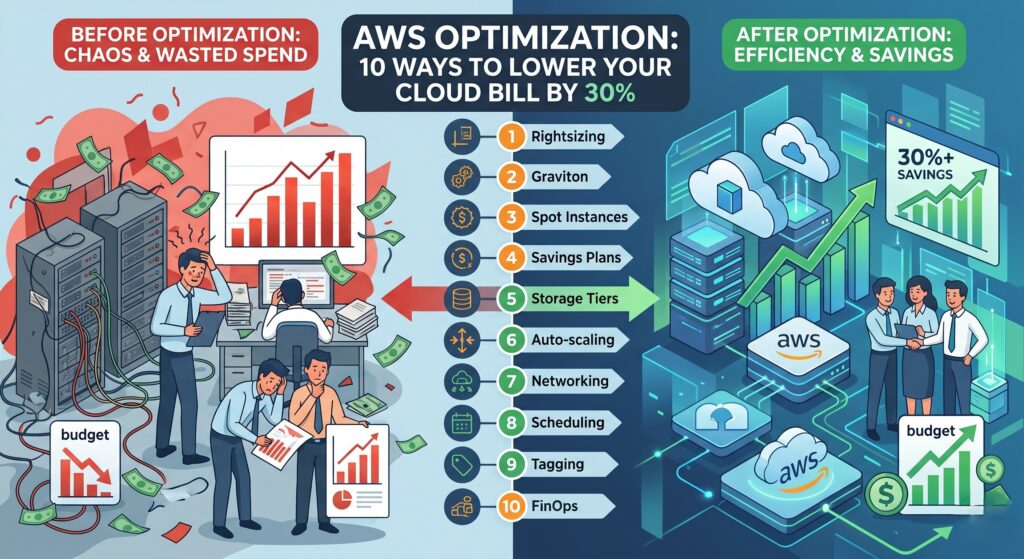
Why do AWS bills spiral out of control?
The transition from traditional DevOps to full-fledged IT management requires a paradigm shift. Engineers often think in terms of uptime and deployment speed, provisioning excess capacity “just in case.” Business leaders, however, think in terms of ROI.
The main causes of overspending:
- Overprovisioning: Allocating resources with a massive surplus.
- “Zombie” resources: Forgotten EBS volumes and unused Elastic IPs.
- Architecture errors: Improper traffic routing (e.g., using expensive NAT Gateways instead of VPC Endpoints).
- Ignoring AWS loyalty programs: Refusing to take advantage of long-term reservation options.
Let’s move on to the practical steps every technical leader should implement.
1. Practice strict Rightsizing
Rightsizing is the process of analyzing the performance of computing resources (EC2, RDS) and databases, followed by adjusting their type or size to the minimum necessary level.
Experience shows that most instances in an unoptimized infrastructure utilize less than 20% of their CPU.
How to implement:
- Use AWS Compute Optimizer. This machine learning-based tool analyzes CloudWatch metrics from the last 14 days and recommends optimal instance types.
- Switch to modern instance generations. Replacing older
m4instances withm6iorm7ioften yields a performance boost while lowering costs. - Database optimization. Databases (e.g., PostgreSQL in Amazon RDS) often consume the lion’s share of the budget. Check your metrics: perhaps you don’t need a
db.r5.4xlarge, and your current workload would run perfectly on adb.m6g.2xlarge.
2. Architecture modernization: Switching to AWS Graviton processors
One of the most elegant ways to reduce cloud costs without changing business logic is migrating to ARM architecture. AWS Graviton processors (specifically Graviton2 and Graviton3) offer the best price-to-performance ratio.
Benefit: Graviton-based instances are up to 20% cheaper than x86 (Intel/AMD) counterparts, with up to 40% higher performance for many workloads.
Where to use:
- Managed services: Amazon RDS, ElastiCache, OpenSearch. Migration here boils down to changing the instance type and restarting (with minimal downtime for Multi-AZ deployments).
- Containerized applications: If your microservices are written in Go, Python, Node.js, or Java, building multi-arch images in your CI/CD pipeline allows for easy deployment on Graviton nodes in EKS or ECS.
3. Implement AWS Savings Plans and Reserved Instances (RIs)
Paying on-demand for baseline, predictable workloads is an unaffordable luxury for a mature business.
| Payment Model | Description | Savings | Ideal for… |
| On-Demand | Pay-as-you-go. No commitments. | 0% | Spiky, unpredictable workloads, R&D. |
| EC2 Reserved Instances | Booking a specific instance type in a specific zone for 1 or 3 years. | Up to 72% | Stable databases (RDS RIs), legacy systems. |
| Compute Savings Plans | Commitment to spend $X/hour on any compute power (EC2, Fargate, Lambda). | Up to 66% | Dynamic teams switching between instance types and regions. |
Advice for the IT Director: Start with Compute Savings Plans. They offer maximum flexibility. If your team decides to move from EC2 to serverless AWS Fargate containers, your discount will continue to apply.
4. Use Spot Instances for fault-tolerant workloads
Spot instances allow you to use unused AWS compute capacity at a discount of up to 90% compared to On-Demand. The main caveat: AWS can reclaim this instance with only 2 minutes’ notice (Spot Instance Interruption Notice).
Best use cases for cost reduction:
- CI/CD Pipelines: GitLab or GitHub Actions runners are perfect candidates for spot instances.
- Big Data & Machine Learning: Processing message queues (RabbitMQ, SQS) where stopping a worker doesn’t lead to data loss.
- Kubernetes (Amazon EKS): Use mixed Node Groups (On-Demand for critical Ingress/Control Plane components and Spot for stateless microservices). Configure
AWS Node Termination Handlerfor graceful pod shutdowns.
5. Block storage optimization: Cleanup and EBS migration
Elastic Block Store (EBS) bills are often overlooked, growing like a snowball. Optimizing storage yields quick wins.
- Switching from
gp2togp3: This is a fundamental rule.gp3volumes are 20% cheaper thangp2and allow you to configure IOPS and throughput independently of volume size. Migration happens on the fly without downtime. - Deleting Unattached Volumes: When an EC2 instance is deleted, the EBS volume often remains if the “Delete on Termination” box wasn’t checked. Set up an AWS Lambda script to weekly scan for volumes in the
Availablestate and either delete them or create a cheap snapshot and delete the original. - Deleting old Snapshots: Backup retention policies (Lifecycle Manager) must be strictly regulated. Keeping daily snapshots from 3 years ago is a waste of money.
6. Intelligent Tiering in Amazon S3
S3 object storage seems cheap ($0.023 per GB), but at terabyte and petabyte scales, costs become significant.
For cost optimization, enable S3 Intelligent-Tiering. This storage class automatically moves objects between access tiers (Frequent, Infrequent, Archive) based on usage patterns. If logs or old media files aren’t accessed for 30 days, AWS will automatically move them to a cheaper tier, saving you up to 60% on storage costs.
7. Hidden budget killers: Network cost optimization (Data Transfer & NAT Gateway)
For IT leaders, network bills are often the biggest and most unpleasant surprise. Data transfer within AWS (between availability zones) and outbound (to the internet) is billable.
How to tackle network costs:
- NAT Gateway architecture: NAT Gateways are charged not just for running hours, but per gigabyte of processed traffic. If your private instances are downloading terabytes of data from S3 or DynamoDB through a NAT, you are losing money.
- Solution: Configure VPC Endpoints (Gateway Endpoints) for S3 and DynamoDB. Traffic will bypass the NAT and travel directly through the AWS internal network—for free.
- Using CloudFront: Data Transfer Out directly from EC2 or S3 to the internet is more expensive than through Amazon CloudFront CDN. Cache your static content!
8. Auto-shutdown for non-production environments (Development / Staging)
Developers don’t write code 24/7. On average, test environments are needed for 40-50 hours a week out of 168 possible hours. Dev/QA clusters running at night and on weekends waste up to 70% of their cost.
Implement AWS Instance Scheduler. This is a ready-made solution from Amazon that allows you to automatically turn off EC2 and RDS instances at 7:00 PM and turn them on at 8:00 AM on workdays based on tags (e.g., Environment = Development).
9. Setting up Cost Explorer, budgets, and anomaly detection
AWS optimization is impossible without transparent analytics. An IT director must see the cost structure in real-time.
- Tagging Policy: Implement mandatory tags for all resources:
Project,Environment,Owner,CostCenter. Without this, you won’t understand which specific microservice or team is “eating” your budget. - AWS Budgets: Set hard limits. Configure alerts (via SNS or Slack integration) when you reach 80% of your planned budget.
- AWS Cost Anomaly Detection: Enable this free ML-based service. If a developer accidentally starts a loop that generates terabytes of logs in CloudWatch, the system will detect the anomalous spending spike and notify you within hours, not at the end of the month.
10. Implementing a FinOps culture
Tools are useless without the right processes. As a leader building a long-term IT strategy, you must integrate cost management into your engineering culture’s DNA. This is the essence of FinOps (Financial Operations).
In traditional DevOps, the focus is on speed and stability. In FinOps, resource cost becomes a quality metric of the system, just as important as Latency or Error Rate.
Steps for leadership:
- Conduct regular architecture reviews with team leads (Well-Architected Framework Reviews, specifically the Cost Optimization section).
- Give developers visibility into their costs. When a team understands the monetary cost of their inefficient SQL query requiring a huge database, code starts being rewritten much faster.
FAQ section
How quickly can results from AWS optimization be seen?
Some actions produce instant results. Switching EBS volumes from gp2 to gp3, cleaning up orphaned resources, and setting up Instance Scheduler for test environments will reduce your bill in the current month. Deeper architectural changes (moving to Graviton or Spot instances) may take from several weeks to months.
Should a startup buy Savings Plans immediately?
If your product is at the MVP stage and the workload is unpredictable—no. Use On-Demand. But once you have found a stable baseline of consumption (e.g., you know for sure that 2 databases and 5 workers will run 24/7 for the next year), reserving this “baseline” with Compute Savings Plans is mandatory.
Do I need to hire a separate FinOps engineer?
For companies with cloud spending up to $10,000–$15,000 per month, a dedicated specialist usually doesn’t pay off; this role should be taken on by a Tech Lead or IT Director in conjunction with the DevOps team. With bills over $50,000/month, FinOps competence becomes a critically necessary investment.
Why is the network bill (Data Transfer) so large, and how can I check it?
AWS does not charge for inbound traffic, but it does charge for outbound and cross-zone transfers. Use the AWS Cost and Usage Report (CUR) along with Amazon Athena to analyze traffic byte-by-byte. Most often, the problem lies in microservices communicating across different Availability Zones or improper static content caching without a CDN.
Conclusion
Reducing cloud costs by 30% is not magic, but the result of systemic IT management and engineering discipline. AWS optimization begins with establishing basic order (deleting trash, rightsizing, upgrading EBS), continues with financial tools (Savings Plans), and is cemented by architectural solutions (Serverless, Spot instances, Graviton).
Are your cloud bills continuing to grow disproportionately to business revenue? Do not wait for the next invoice. Delegate the technical audit to experts. Our team will help conduct a deep analysis of your infrastructure, identify budget leaks, and implement FinOps practices. Contact us today for a preliminary assessment of your AWS infrastructure!