

IT infrastructure security in today’s reality is not a “one-time setup,” but a continuous risk management process. For CTOs and technical leads of companies operating in the Ukrainian and international markets, the price of an error is measured not only by downtime but also by the loss of reputational capital. This server security checklist is based on practical experience with Azure/AWS migrations and audits of high-load systems. We will break down 15 stages that will allow you to conduct a comprehensive server audit and close vulnerabilities before attackers exploit them.
Why are standard “out of the box” settings no longer enough?
Most cybersecurity incidents in medium and large businesses occur not because of hyper-complex attacks, but due to trivial configuration errors. A database port left open, the use of a standard SSH port, or a lack of key rotation is an invitation for botnets. According to 2025 statistics, automated scanners find an unprotected server on the network in an average of 15–20 minutes after it goes online.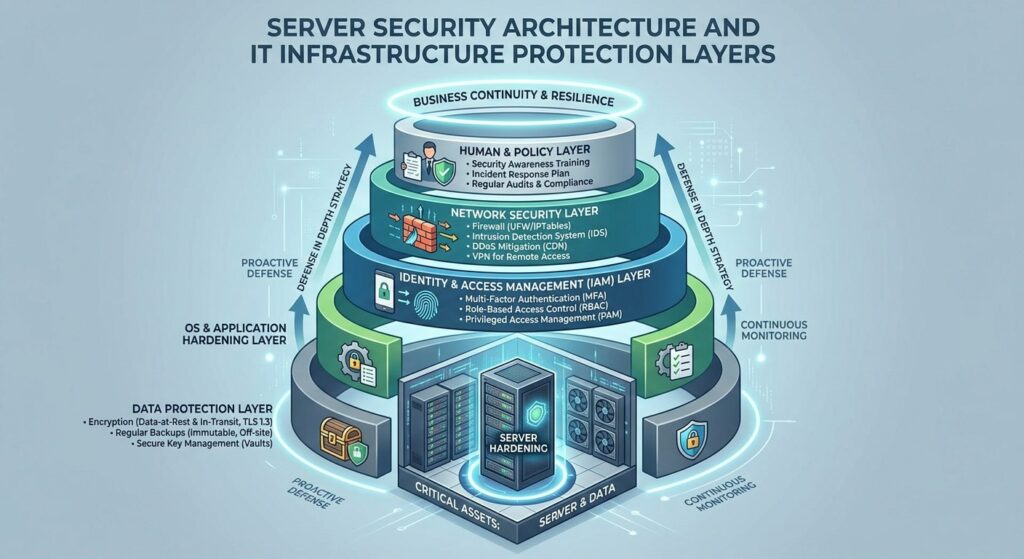
Server Security Checklist: 15 Stages of Deep Audit
1. Access Management and SSH (Hardening)
The first line of defense is restricting entry paths.
- Disabling Root Login: Direct access as a superuser is a critical vulnerability. Use
sudofor administrative tasks. - SSH Key Authentication: Passwords are susceptible to brute-force attacks. SSH keys with the Ed25519 algorithm provide a significantly higher level of protection.
- Changing the Standard Port: Moving SSH from port 22 to a non-standard one (e.g., in the 40000–50000 range) reduces the volume of “noise” attacks from bots by 90%.
2. Principle of Least Privilege (PoLP)
Every service or employee should only have access to the resources necessary to perform a specific task.
- Service Isolation: Running web servers (Nginx/Apache) or databases under dedicated system users with limited rights.
- Sudoers Control: Regular auditing of the
/etc/sudoersfile for any redundant accounts.
3. Firewall Configuration
The rule “deny everything that is not explicitly allowed” must be fundamental.
- UFW/IPTables/Firewalld: Configure inbound traffic filtering.
- Whitelisting: Access to administrative panels and management ports should only be open to specific company IP addresses or via VPN.
4. Regular Software Updates and Patch Management
Zero-day (0-day) vulnerabilities are a reality.
- Automatic Security Updates: In Ubuntu/Debian, use
unattended-upgrades. - Dependency Audit: Checking libraries (especially in Docker containers) for known CVEs.
5. OS-Level Security (Kernel Hardening)
For high-load systems, it is important to limit kernel exploitation opportunities.
- SELinux or AppArmor: Use Mandatory Access Control (MAC) systems. They prevent the spread of an attack even if a service has been compromised.
- Restricting access to
/procand/sys: Preventing information gathering about the system by unprivileged users.
6. Network Level Protection and DDoS Protection
For companies in Ukraine, protection against transborder attacks is highly relevant.
- Fail2Ban: Automated blocking of IP addresses after several failed authorization attempts.
- Use of CDN: Cloudflare or AWS Shield to absorb L7 attacks on web applications.
7. Auditing and Logging (SIEM/Logging)
You cannot protect what you cannot see.
- Centralized Log Collection: Set up the transfer of system and application logs to ELK Stack (Elasticsearch, Logstash, Kibana) or Graylog.
- Auditd: Use the audit daemon to track changes in critical configuration files.
8. Data Encryption (Data-at-Rest & In-Transit)
- TLS 1.3: Discontinuing outdated SSL and TLS 1.0/1.1 protocols.
- HSTS: Enforcing HTTPS for all connections.
- Disk Encryption: Using LUKS or cloud encryption tools (Azure Disk Encryption) to protect physical data.
9. Backup and Disaster Recovery (DRP)
Backup is the last line of defense against Ransomware.
| Parameter | Requirement |
| Geo-Distribution | Storing copies in a different region (e.g., Kyiv -> Frankfurt) |
| Immutable Backups | Unchangeable backups that cannot be deleted even with admin rights |
| Testing | Verification of data recovery at least once a month |
10. Container Security (Docker/Kubernetes)
If you use microservices, the focus shifts to runtime security.
- Run without Root: Containers should never run as the host’s root user.
- Read-only File System: Configuring containers to work with a “read-only” file system wherever possible.
11. Secrets Management
Never store passwords, API tokens, and keys in the code (Hardcoding) or in .env files in Git.
- Vault Solutions: Use HashiCorp Vault, AWS Secrets Manager, or Azure Key Vault.
12. Vulnerability Scanning
Automated server audit should be a part of your CI/CD process.
- Tools: OpenVAS, Nessus, or cloud scanners (Azure Defender). Check the system for open ports and outdated packages weekly.
13. Database Protection
The database is a primary target for attackers.
- Listen only to localhost: By default, the DB should not be accessible from the outside.
- Privilege Separation: The application should only have rights for DML operations (SELECT, INSERT, UPDATE), but not DDL (DROP, ALTER).
14. File Integrity Monitoring (FIM)
- AIDE / Tripwire: These tools create a database of system file checksums and notify you of any unauthorized changes.
15. The Human Factor and 2FA
Even the most protected infrastructure can fall due to phishing.
- Two-Factor Authentication (MFA): Mandatory for all control panels (Cloud Console, VPN, SSH).
FAQ: Frequently Asked Questions on Server Security
1. How often should a full server audit be conducted?
At least once a quarter. However, automated scanning for CVEs should occur daily during image builds or system updates.
2. Will a cloud provider (Azure/AWS) protect my server completely?
No. There is a Shared Responsibility Model. The provider protects the “cloud” (physical servers, network), and you are responsible for security “in the cloud” (OS, applications, data).
3. Is it worth using free antiviruses for Linux servers?
For servers, Intrusion Detection/Prevention Systems (IDS/IPS) and Hardening are more important than a classic antivirus. However, ClamAV can be useful for scanning user-generated content.
4. Should I close ICMP (ping)?
It is not a panacea, but hiding the server from simple “ping-sweeps” can slightly reduce visibility to primitive bots.
Conclusion
Security is not a static state, but a dynamic process. Implementing this checklist will significantly reduce the probability of a successful attack and minimize damage in the event of an incident.
If you feel that your infrastructure requires a professional outside perspective, or you are planning a secure migration to the cloud — our team is ready to conduct a deep audit and set up “turnkey” protection. Don’t wait for an incident to start acting.